> For the complete documentation index, see [llms.txt](https://ios-course.cornellappdev.com/llms.txt). Markdown versions of documentation pages are available by appending `.md` to page URLs; this page is available as [Markdown](https://ios-course.cornellappdev.com/resources/archived-past-semesters/fa25/assignments/a1-swift-basics.md).
# A1: Swift Basics
Original Author: Vin Bui
{% hint style="danger" %}
**Assignment Due: Friday Oct 24, 2025 11:59pm**
{% endhint %}
{% file src="/files/9ZGsAjtulgoCVCe11n3x" %}
## Overview
***
The goal of this assignment is to help you become familiar with basic Swift syntax and version control with Git and GitHub.
## Learning Objectives
***
**Developer Skills**
* How to implement functions according to a specification
* How to read documentation from outside resources
* How to read, create, and use functions to organize code
* How to work with Git and GitHub for version control
**Course Material**
* How to use string interpolation to combine variables with strings
* How to convert data types using type casting
* How to create and work with arrays and dictionaries
* How to use conditionals to control program flow
* How to use methods provided by Swift
* How to use loops to repeat code
* How to work with optionals
* How to use higher order functions to simplify code
## Academic Integrity
***
As with any other course at Cornell, the Code of Academic Integrity will be enforced in this class. All University-standard Academic Integrity guidelines should be followed. This includes proper attribution of any resources found online, including anything that may be open-sourced by AppDev. The University guidelines for Academic Integrity can be found [here](https://theuniversityfaculty.cornell.edu/academic-integrity/).
**This assignment must be done individually.** However, we do encourage *limited* collaboration. You are also free to come to the instructors or any course staff for help. Programming forums like *Stack Overflow* or *Hacking with Swift* are allowed as long as you understand the code and are not copying it exactly. Code written through AI means such as ChatGPT is **NOT ALLOWED**. However, you may use these resources for assistance, although we highly encourage consulting Ed Discussion or office hours instead.
## Getting Help
***
If you are stuck or need a bit of guidance, please make a post on Ed Discussion or visit [office hours](/resources/archived-past-semesters/fa25/logistics/office-hours.md). **Please do not publicly post your code on Ed Discussion.** If you are using an external resource such as Stack Overflow, keep in mind that we are using UIKit with Swift 5. If you see anything with @IBOutlet or any weird syntax, then you are most likely looking at a different version.
## Grading Rubric
***
The grading for TODOs 1-9 are based on the number of test cases that you pass. We will convert the values to a decimal and their sum will be your subtotal (out of 10). The feedback form link is located in the [Submission](#submission) section of this handout.
| TODO 1: `introduce` | \_ / 2 |
| ----------------------------------------------------------- | -------------------------------------------- |
| TODO 2: `getStudentInfo` | \_ / 1 |
| TODO 3: `countEvens` | \_ / 4 |
| TODO 4: `capitalizeStrings` | \_ / 4 |
| TODO 5: `repeatString` | \_ / 4 |
| TODO 6: `countWords` | \_ / 6 |
| TODO 7: `containsNum` | \_ / 4 |
| TODO 8: `uppercaseLead` | \_ / 6 |
| TODO 9: `filterImposter` | \_ / 6 |
| Feedback Survey | \_ / 1 |
| **SUBTOTAL** | **\_ / 10** |
| Deduction: Crash Tax | -1 point |
| **GRAND TOTAL** | **\_ / 10** |
## Getting Started
***
### Opening the Project
Download and unzip the files at the top of this page. Navigate to the files located on your local computer drive. Inside of the folder should contain an Xcode project called `A1.xcodeproj`. Open up the project.
### Locating the Source Code
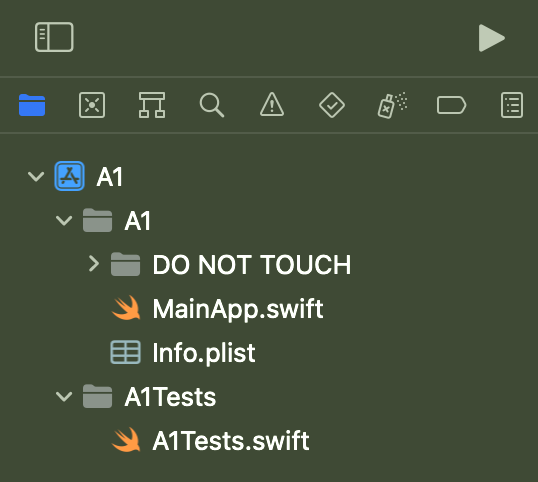
Once you have the project opened, on the left side of the screen you should see the Navigator which contains all of the folders and files in the directory. If not, press `CMD + 0` (that’s a zero) on your keyboard.
If you expand everything underneath `A1` you should see the following:
**You will be working on ****`MainApp.swift`**** and ****`A1Tests.swift`****.**
## Part I: Assignment Files
***
### `MainApp.swift`
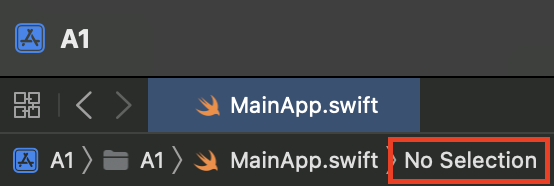
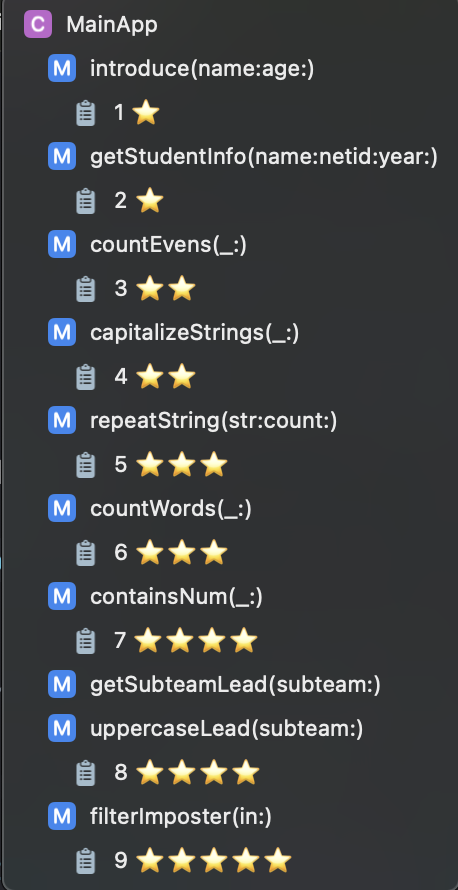
You will be implementing the functions provided in this file. **There are a total of 9 TODOs.** If you click on this red box at the top of your Xcode, there should be a dropdown menu.
If you click on the clipboards, you will directed to the TODOs. The stars (⭐️) represent the difficulty level of each function. At the top of each function header is the ***specification***. **Your goal is to implement the function according to the specification. DO NOT CHANGE THE FUNCTION HEADER.** We have given you hints to help you complete the tasks.
### `A1Tests.swift`
This file contains the test cases for each function. **DO NOT EDIT THIS FILE.**
There are two ways to run the test cases:
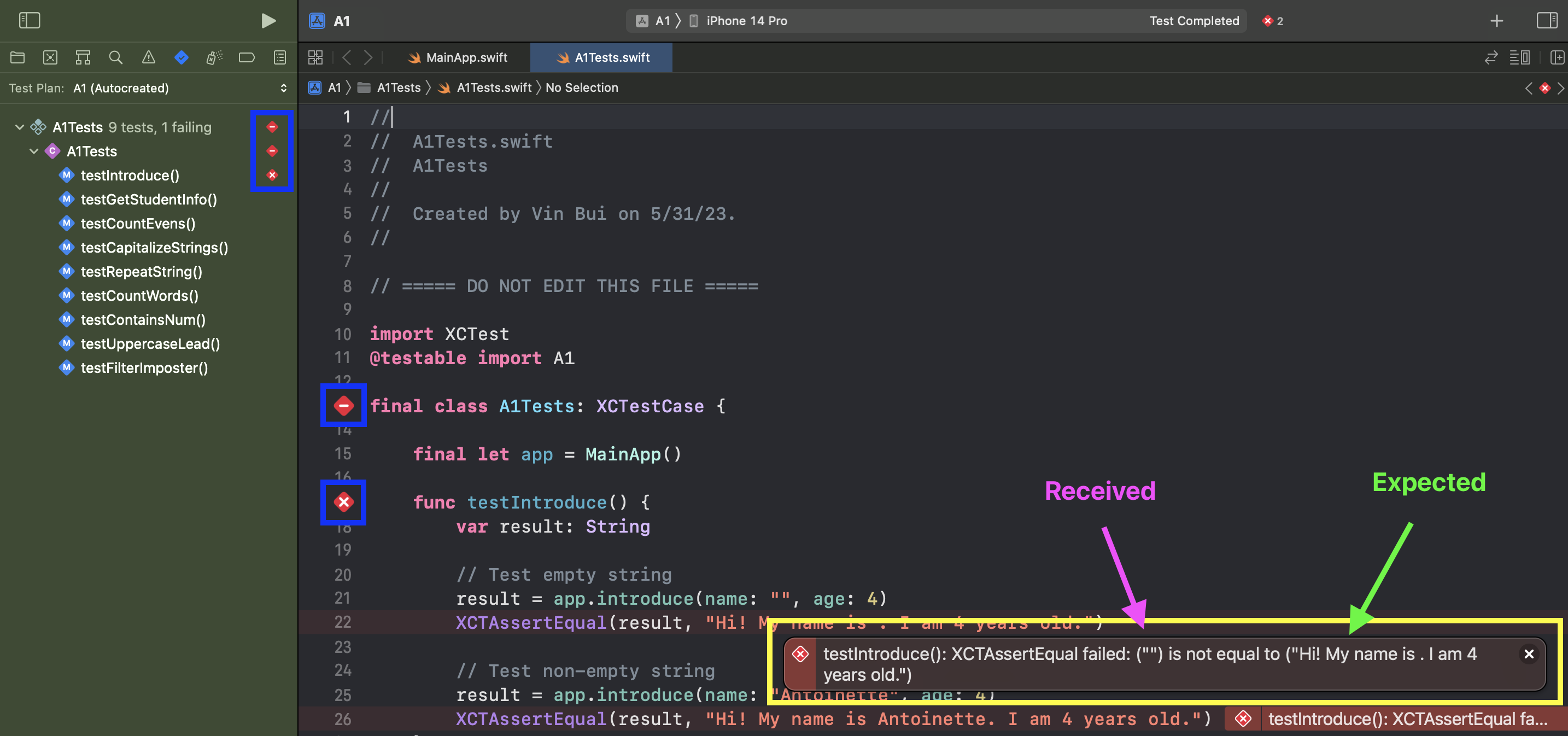
1. You can run the entire test suite by clicking on the button in the blue box next to `final class A1Tests: XCTestCase` in the Editor or `A1Tests` in the Navigator on the left.
2. You can run test cases for a specific function by clicking on the button in the blue box next to the function (such as `func testIntroduce()`) in the Editor or in the Navigator on the left.
When you run the test suite for the first time, it may take about 30 seconds to 1 minute to load. After the first launch, it should not take that long. If the Simulator opens up, keep it open as it is required to run the test suite (for some reason). **You will get a popup saying “Build Succeeded”, but this does not mean that you have passed the test cases. A passed test case will have green checkmarks and no error messages.**
The yellow box above indicates an error message. The value pointed by the pink arrow is the “Received” output which is what your implementation returned. The value pointed by the green arrow is the “Expected” output which is what your function *should* return. The console will also output the error message.
{% hint style="danger" %}
**Make sure you are using an iPhone simulator at the top of Xcode.**
{% endhint %}
## Part II: Implementing the Functions
***
There are a total of 9 functions that you need to implement with varying levels of difficulty (indicated by a ⭐️). Follow these steps when working on the assignment:
1. Begin **TODO 1** and implement the function.
2. Run the test function for **TODO 1**. If failed, fix your function and try again. If passed, move on to the next step.
3. Repeat for **TODOs 2-9**
## Submission
***
1. Double-check that all of your files are properly filled out.
2. Zip all of your files, you can right-click the folder they are in and click "compress"
3. Submit the assignment to CMSX
4. Fill out this [feedback survey](https://forms.gle/MxVK3Bjnv6k8EJDA9) (worth 1 point).