> For the complete documentation index, see [llms.txt](https://ios-course.cornellappdev.com/llms.txt). Markdown versions of documentation pages are available by appending `.md` to page URLs; this page is available as [Markdown](https://ios-course.cornellappdev.com/resources/textbook/swift-basics/optionals.md).
# Optionals
Fall 2023 | Vin Bui
{% hint style="info" %}
**This is one of the most important concepts in iOS development!**
{% endhint %}
Sometimes we may want to show that our data does not have any value. If we were using Strings, then an empty string may be a good indicator for “no value”. What about integers? We could use 0 or -1. The problem with this is that we are creating imaginary rules for ourselves. Swift solves this issue by introducing **optionals**.
### Indicating an optional
To indicate an optional in Swift, we use a `?` succeeding the data type. For example, a string optional (or optional string) is represented by `String?`. This String optional can hold two things:
1. a String value
2. `nil`
`nil` means “nothing” or “no value”. To better understand optionals, let’s look at the following example:
```swift
func getSubteamLead(subteam: String) -> String? {
if subteam == "ios" { return "Tiffany Pan" }
if subteam == "design" { return "Christina Zeng" }
if subteam == "marketing" { return "Eddie Chi" }
if subteam == "android" { return "Emily Hu" }
if subteam == "backend" { return "Joyce Wu" }
return nil
}
```
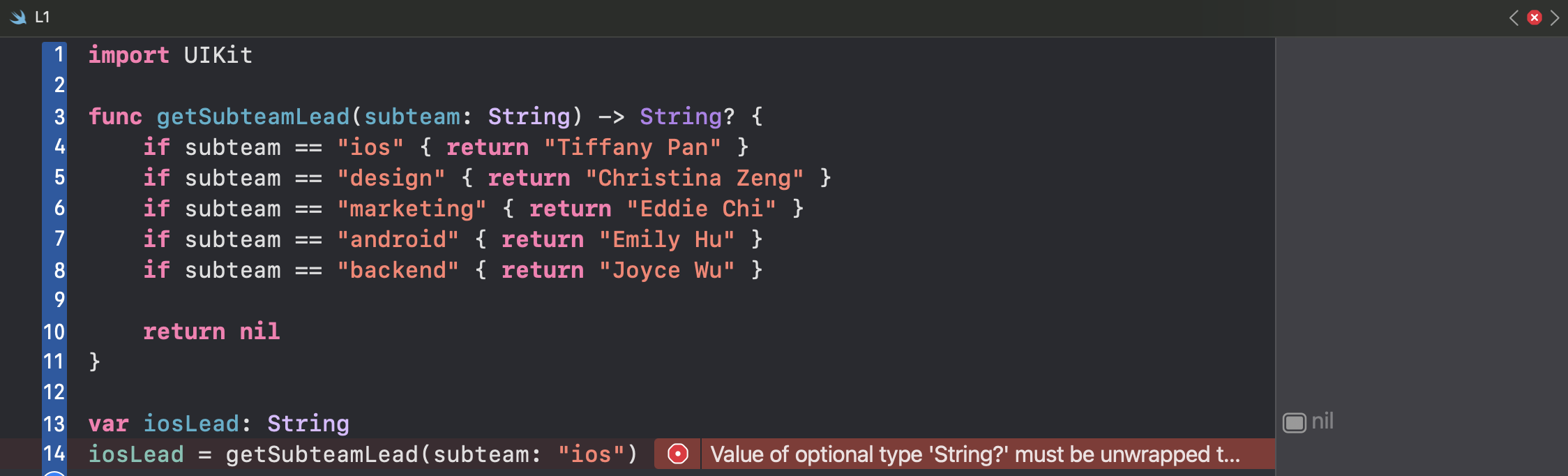
This function returns a *String optional* with value `“iOS is the best subteam”` if the argument is `"ios"` and `nil` otherwise. Let’s put this in the playground and try to store this value into a variable:
What is the issue with this code? Well, the type of the variable `iosLead` is a `String` but the function returns a `String?`. These two data types are ***different***. In that case, we could change the data type of `iosLead` to `String?`.
Okay, but what if there was a function that only takes in a `String` and not a `String?` but we still want to use the value returned from `getSubteamLead`?
```swift
func getSubteamLead(subteam: String) -> String? {
if subteam == "ios" { return "Tiffany Pan" }
if subteam == "design" { return "Christina Zeng" }
if subteam == "marketing" { return "Eddie Chi" }
if subteam == "android" { return "Emily Hu" }
if subteam == "backend" { return "Joyce Wu" }
return nil
}
func cheerLead(name: String) {
print("Woo! Go \(name)!")
}
cheerLead(name: getSubteamLead(subteam: "ios"))
```
This code will not execute because `getSubteamLead` returns a `String?` but the function `cheerLead` takes in a `String`. In this case, we would need to unwrap the optional.
### Safely unwrapping optionals
In order to grab the non-nil value of an optional, we must **unwrap** it. There are three ways to do this:
1. `if let`
2. `guard let`
3. Force unwrapping (`!`)
The first two provides a safe way to unwrap the optional. Using the example from earlier, let’s try to unwrap the optional:
```swift
func getSubteamLead(subteam: String) -> String? {
if subteam == "ios" { return "Tiffany Pan" }
if subteam == "design" { return "Christina Zeng" }
if subteam == "marketing" { return "Eddie Chi" }
if subteam == "android" { return "Emily Hu" }
if subteam == "backend" { return "Joyce Wu" }
return nil
}
func cheerLead(name: String) {
print("Woo! Go \(name)!")
}
if let leadName = getSubteamLead(subteam: "ios") {
cheerLead(name: leadName)
}
```
The constant `leadName` holds the unwrapped value returned from the function call `getSubteamLead`. We would then use `leadName` within the **if** statement. Now, if the function returned `nil` instead, then the block of code will not be executed.
We could also use a `guard let` statement:
```swift
func getSubteamLead(subteam: String) -> String? {
if subteam == "ios" { return "Tiffany Pan" }
if subteam == "design" { return "Christina Zeng" }
if subteam == "marketing" { return "Eddie Chi" }
if subteam == "android" { return "Emily Hu" }
if subteam == "backend" { return "Joyce Wu" }
return nil
}
func cheerLead(name: String) {
print("Woo! Go \(name)!")
}
// Create a custom error
enum myError: Error {
case incorrectSubteam
}
guard let leadName = getSubteamLead(subteam: "ios") else {
// Usually we would return something here but because this is not
// a function, we had to throw an error
throw myError.incorrectSubteam
}
cheerLead(name: leadName)
```
The main difference between using an `if let` versus a `guard let` statement is the scope of the variable/constant. The constant `leadName` lives *within* the block of code in an `if let` statement whereas in a `guard let` statement, it lives *outside* of it. As we can see above, we are able to use the constant `leadName` outside of the `guard let` statement.
{% hint style="info" %}
**We would want to use a `guard let` statement if we want to use the value many times outside of the block of code, or when we want to terminate the code early when a condition is false for efficiency purposes.**
{% endhint %}
### Force unwrapping optionals
Another (not recommended) approach to unwrap an optional is to force unwrap it using an exclamation mark (`!`).
{% hint style="danger" %}
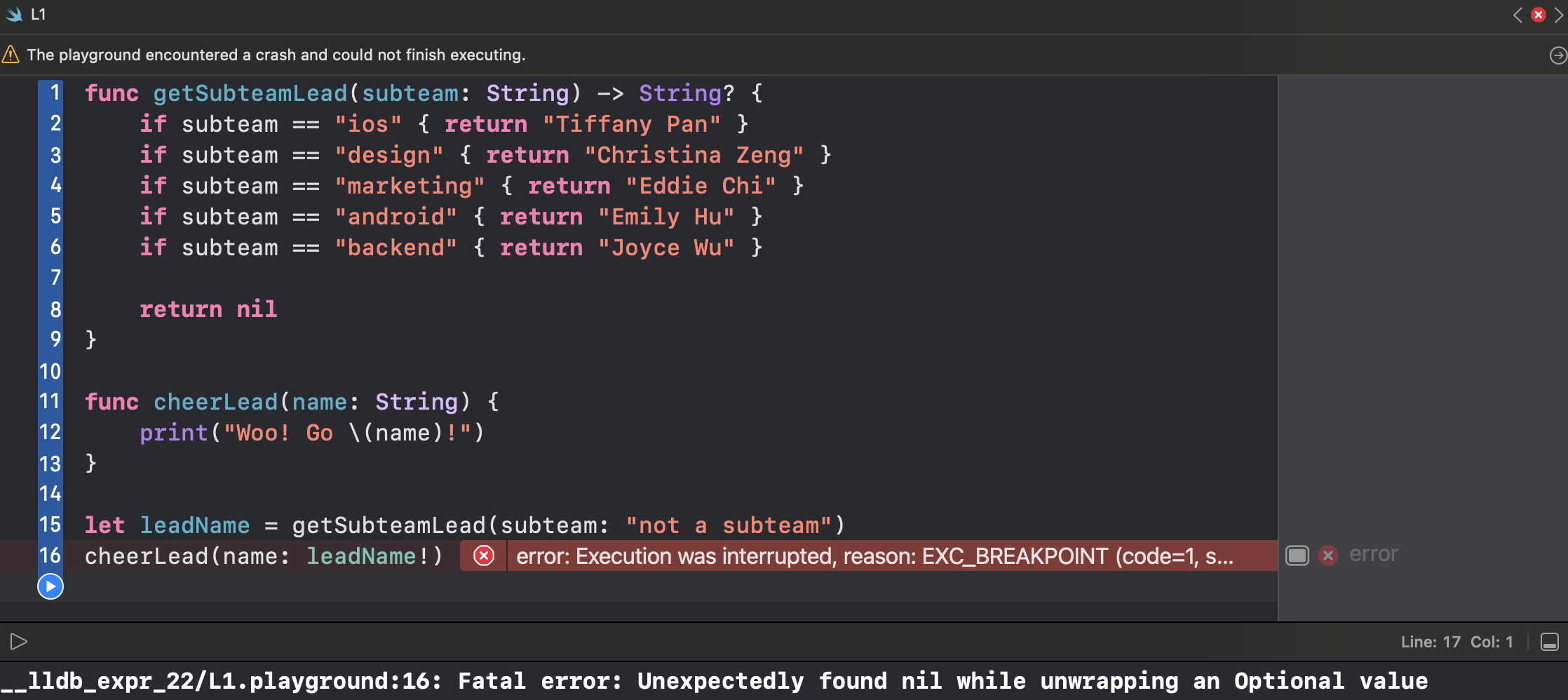
**Be careful! If we try to unwrap an optional that is holding `nil`, our program will crash!**
{% endhint %}
Let me emphasize this again. Our code will crash if we unwrap an optional that is holding `nil`. We should only use this approach if we are 100% certain that the optional holds an actual value. However, most of the time we should not have to use this. Let’s use the code from earlier:
```swift
func getSubteamLead(subteam: String) -> String? {
if subteam == "ios" { return "Tiffany Pan" }
if subteam == "design" { return "Christina Zeng" }
if subteam == "marketing" { return "Eddie Chi" }
if subteam == "android" { return "Emily Hu" }
if subteam == "backend" { return "Joyce Wu" }
return nil
}
func cheerLead(name: String) {
print("Woo! Go \(name)!")
}
let leadName = getSubteamLead(subteam: "ios")
cheerLead(name: leadName!)
```
In this case, we know that the code will not crash because we are certain that `leadName` will not hold `nil`. However, `leadName` *could* hold nil and our code will crash if it does.
### Implicitly unwrapped optionals
Earlier, we mentioned that we can indicate an optional by using a question mark (`?`). For example, we can indicate a String optional by doing `String?`. We can also use an exclamation mark (`!`) such as `String!`. The difference between these two is that the constant or variable with the data type that contains the exclamation mark, does not need to be unwrapped before it is used. This is called an **implicitly unwrapped optional**. We unwrap the optional the moment the variable or constant is initialized. We are very likely to see this when we get into UIKit.
{% hint style="info" %}
**Be careful because our code will still crash if this variable/constant holds `nil`.**
{% endhint %}
### Optional chaining
It can get very annoying having to unwrap optionals using `guard let` or `if let` statements and can clutter our code a lot. This may cause many people to be tempted to force unwrap an optional which we should already know is not good. Let’s take a look at the following code:
```swift
func getSubteamLead(subteam: String) -> String? {
if subteam == "ios" { return "Tiffany Pan" }
if subteam == "design" { return "Christina Zeng" }
if subteam == "marketing" { return "Eddie Chi" }
if subteam == "android" { return "Emily Hu" }
if subteam == "backend" { return "Joyce Wu" }
return nil
}
let uppercaseDesign = getSubteamLead(subteam: "design").uppercased()
```
If we put this code in the playground, Xcode will give us an error.
The problem is that the `uppercased` method is only available for `String` types, not `String?` types. Since `getSubteamLead` returns a `String?` we would need to unwrap it before we can use it in the `uppercased` method. However, this is very annoying to do and can make our code cluttered. Thankfully, Swift allows us to use **optional chaining**:
```swift
let uppercaseDesign = getSubteamLead(subteam: "design")?.uppercased()
```
That extra `?` after the call to `getSubteamLead` is the ***optional chaining***. This means everything after the `?` will only be run if everything before it has a value and is not `nil`. Try this in the playground and the error message will go away.
### Nil coalescing operator
Another clean way to handle optionals in our code is to use the **nil coalescing operator**. The following code is an example of how to use it:
```swift
let designLead = getSubteamLead(subteam: "design") ?? "Invalid"
```
The `??` is the ***nil coalescing operator*** and it provides a default value if the optional is holding `nil`. In the code above, if the call `getSubteamLead(subteam: "design")` returned `nil`, then the constant `designLead` will hold the default value `"Invalid"` instead of `nil`. This is very nice because we do not have to unwrap anything and ensures that there is an actual value.