> For the complete documentation index, see [llms.txt](https://ios-course.cornellappdev.com/llms.txt). Markdown versions of documentation pages are available by appending `.md` to page URLs; this page is available as [Markdown](https://ios-course.cornellappdev.com/resources/textbook/swift-basics/variables-and-constants.md).
# Variables and Constants
Fall 2023 | Vin Bui
In almost any program that we create, we will need to store data at some point. In Swift, we can store data in two ways: **variables** and **constants**. We can think of both variables and constants as a box holding some value inside. However, there is one key difference between these two. A variable can change its value whenever we want. On the contrary, a constant can hold a value once and can never be changed again.
It may seem pointless to have both variables and constants; however, there are many advantages. If Xcode knows that a value will never change, it will optimize our program to make it run faster. Another advantage is that if we were to make a mistake and change a value of a constant when we don’t need to, Xcode will tell us and our code will not compile.
### Variables
To create a variable, we use the `var` keyword.
```swift
var instructor = "Vin"
```
To change the value of the variable, we can simply do the following.
```swift
var instructor = "Vin"
instructor = "Richie"
```
Let’s try this in the Xcode playground.
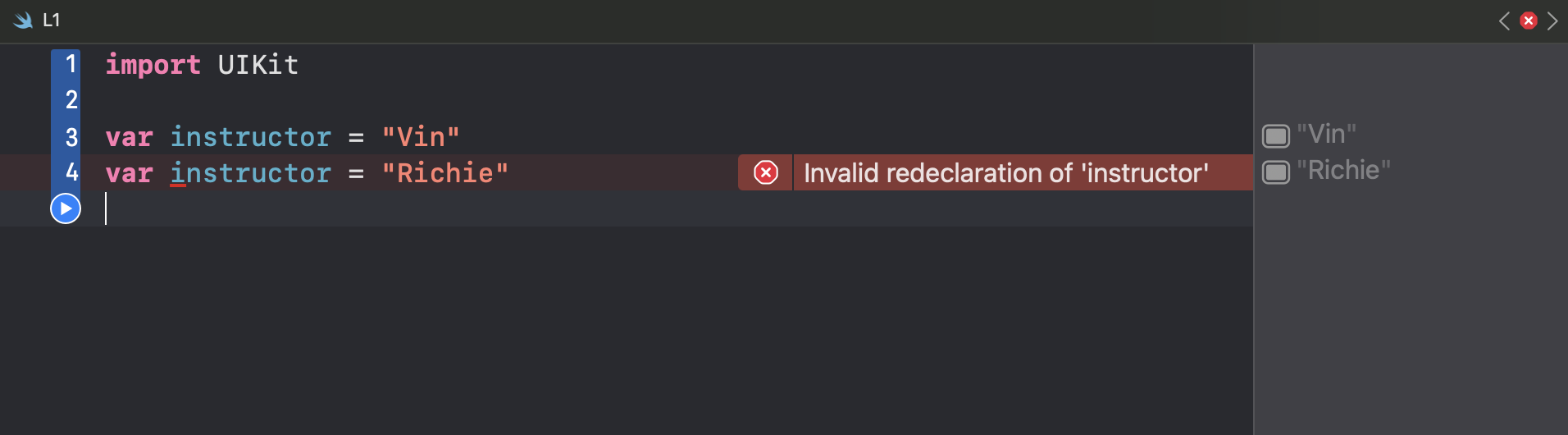
Notice how we do not need to use the `var` keyword the second time. We should only use the `var` keyword if we are declaring a new variable. We can test this out in the Xcode playground.
### Constants
Now, what if we wanted to use a constant instead of a variable? All we would need to do is to use the `let` keyword instead.
As we can see, changing the `instructor` variable to a constant caused Xcode to get angry. The error message clearly informs us that we are attempting to change the value of a constant.
{% hint style="info" %}
**It is also convention to use camelCase with Swift!**
{% endhint %}